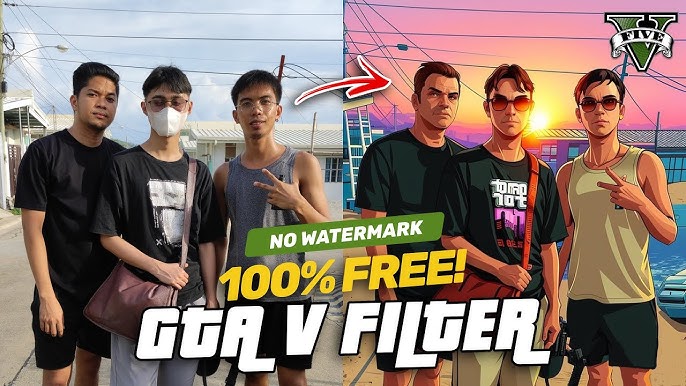
If you’ve ever been captivated by the vibrant, edgy aesthetics of Grand Theft Auto (GTA) artwork and wished your photos could look just as striking, you’re not alone. The bold outlines, cinematic lighting, and cartoonish yet realistic vibe of GTA’s iconic art style have made it a favorite for gamers, content creators, and digital artists alike. In this guide, we’ll explore how to convert your photo into GTA style, the tools and apps you can use, tips for achieving professional results, and why this style is so popular in today’s digital era.
What is GTA Style Artwork?
Before diving into the conversion process, it’s important to understand what GTA style artwork is. GTA art, especially the promotional and cover art for games like GTA V, features:
- Bold, clean outlines: Characters and objects are emphasized with distinct, thick lines.
- Vibrant yet slightly muted colors: The color palette is rich but stylized, with subtle shading to create depth.
- Cartoonish realism: Characters maintain realistic proportions but with exaggerated expressions or poses.
- Pop-culture influence: GTA art often has a comic-book or poster-like feel.
This combination of realism and stylization makes GTA art instantly recognizable and highly appealing for avatars, social media posts, and digital art collections.
Why Convert Your Photo into GTA Style?
Converting your photo into GTA style isn’t just a fun experiment—it has practical uses:
- Unique Social Media Profile Pictures: Stand out on Instagram, TikTok, Facebook, and Twitter with a Rockstar Games-inspired avatar.
- Gaming Identity: Gamers love using GTA-style portraits for their YouTube channels, Twitch streams, and in-game branding.
- Digital Art Portfolio: Artists can showcase their skills by transforming regular photos into stylized artwork.
- Creative Gifts: Personalized GTA portraits make for fun and memorable gifts.
Whether you’re an artist, gamer, or content creator, learning this technique can boost your digital presence.
Methods to Convert Your Photo into GTA Style
There are several ways to achieve a GTA-style transformation. From AI-based tools to manual digital illustration, each method has its pros and cons.
1. AI-Based Photo to GTA Style Converters
AI tools have made turning your photos into stylized artwork easier than ever. Some popular options include:
- Fotor AI Art Generator: Upload your photo and select the “GTA/Cartoon” style for instant results.
- Photoshop Neural Filters: Adobe Photoshop’s AI filters allow you to apply stylized effects that mimic GTA aesthetics.
- Online AI Tools: Websites like Toongineer Cartoonizer or Cartoonify can also create GTA-inspired artwork in seconds.
Pros: Fast, beginner-friendly, no drawing skills required.
Cons: Limited customization, results may look generic without tweaks.
Tip: Always start with a high-resolution photo to retain clarity in the final artwork.
2. Manual Digital Illustration
If you’re skilled in digital art, recreating the GTA style manually gives you complete control over the result. Tools like Adobe Illustrator, CorelDRAW, or Procreate are excellent for this approach.
Steps:
- Trace the Outline: Use your photo as a base layer and trace your features with bold, clean lines.
- Add Flat Colors: Choose vibrant colors for skin, hair, and clothing. Avoid complex gradients.
- Apply Shadows and Highlights: Use simple, stylized shading to create depth.
- Add Details: Include accessories, background elements, and textures that reflect GTA’s comic-like aesthetic.
Pros: Fully customizable, professional-quality results.
Cons: Time-consuming, requires artistic skills.
3. Using Mobile Apps
For mobile users, apps can transform photos into GTA style quickly:
- PicsArt: Offers cartoon and comic effects that can be adjusted for a GTA vibe.
- Voila AI Artist: Turns photos into 3D cartoon or 2D comic styles.
- Prisma: Provides artistic filters that can mimic the GTA comic look.
Tip: Combine filters and manual touch-ups for more authentic GTA effects.
Step-by-Step Guide to Convert Your Photo
Here’s a detailed, step-by-step approach for converting your photo into GTA style:
Step 1: Choose Your Photo
Select a photo with clear facial features and a simple background. GTA art emphasizes characters, so your face should be well-lit and in focus.
Step 2: Decide on the Style
Do you want your photo to resemble GTA V cover art, GTA IV posters, or a more comic-book-inspired version? The reference will guide your color palette, outlines, and shading.
Step 3: Prepare Your Photo
Use image-editing software to adjust brightness, contrast, and sharpness. This ensures clean lines and vibrant colors after conversion.
Step 4: Apply Outline and Coloring
- AI Tool: Upload the photo, select the GTA/cartoon effect, and download.
- Manual: Trace the outlines digitally and fill in colors.
Step 5: Add Shading and Highlights
Apply simple shadows for depth, avoiding complex gradients. Focus on key areas like the face, clothing folds, and hair.
Step 6: Background and Effects
GTA art often features minimal or stylized backgrounds. Add cityscapes, cars, or abstract shapes to enhance the Rockstar feel.
Step 7: Final Touches
Add bold outlines, enhance color vibrancy, and ensure details like glasses, hats, or tattoos are accurately represented.
Prompt:
Prompt ⬇️
1 –
{ “ABSOLUTE_OVERRIDE_RULE”: { “priority”: “HIGHEST”, “instruction”: “The uploaded reference image MUST NOT be reused, traced, filtered, color-graded, or partially preserved in any way. Reusing original pixels is a hard failure.”, “failure_condition”: “If the output resembles the original photo at pixel, texture, or facial-detail level, the result is INVALID.” }, “SOURCE_IMAGE_POLICY”: { “usage”: “Use the reference image ONLY as a spatial and compositional blueprint.”, “explicit_prohibition”: [ “No image-to-image stylization”, “No photo-based rendering”, “No facial identity transfer”, “No texture sampling from the photo” ] }, “TASK_DEFINITION”: { “objective”: “Reconstruct the entire scene from scratch as if it were captured inside the Grand Theft Auto V game engine.”, “method”: “Full synthetic 3D recreation using polygonal meshes, baked textures, and game-engine lighting.” }, “STYLE_AND_ENGINE_CONSTRAINTS”: { “engine”: “GTA V RAGE Engine (2013–2015 era)”, “visual_identity”: [ “Clearly polygonal character models”, “Game-engine skin shaders (slightly waxy, non-photoreal)”, “Repeating environment textures with visible tiling”, “LOD-style geometry simplification” ], “strictly_avoid”: [ “Photorealism”, “AI-upscaled realism”, “Cinematic CGI renders”, “Photo-like skin pores or cloth fibers” ] }, “CHARACTER_RECONSTRUCTION_RULES”: { “identity”: “Characters must resemble generic GTA V NPCs or protagonists, NOT the real person.”, “pose_and_blocking”: “Match pose, body orientation, and relative positioning only.”, “face_rule”: “Faces must look like GTA NPC meshes — simplified topology, not real human likeness.” }, “ENVIRONMENT_TRANSLATION”: { “world”: “Los Santos equivalent environment only.”, “object_mapping_examples”: { “smartphone”: “in-game iFruit phone prop”, “street”: “GTA asphalt texture with decals”, “buildings”: “Los Santos modular architecture assets”, “vegetation”: “GTA V foliage system” }, “background_rule”: “The back
Tips for Realistic GTA Style Transformation
- High Contrast is Key: GTA art relies on strong contrast to make characters pop.
- Keep It Simple: Avoid overcomplicating details; flat colors and bold lines are more effective.
- Use References: Analyze GTA cover art to understand style patterns.
- Experiment with AI and Manual Techniques: Combining both approaches often yields the best results.
- Focus on Expressions: GTA characters often have exaggerated or confident expressions—emulate this for authenticity.
Prompt:
“Transform this photo into a GTA 5-style image, including the background.”
GTA Style Background Ideas
The background can enhance your GTA-style artwork:
- City Streets: Classic urban backdrop with cars, streetlights, and graffiti.
- Beach Scenes: Inspired by GTA V’s Los Santos, palm trees and bright skies.
- Neon Lights: Nighttime cityscapes with glowing neon signs for a retro feel.
- Abstract Pop Art: Bold shapes and colors that emphasize the character.
Common Mistakes to Avoid
- Overcomplicating Colors: GTA art favors simplicity—too many colors can ruin the style.
- Ignoring Facial Features: The face is the centerpiece; ensure details like eyes and mouth are clear.
- Low-Resolution Photos: Pixelated images reduce quality; start with HD photos.
- Skipping References: Without GTA references, it’s easy to stray from the style.
Applications of GTA-Style Portraits
- Social Media Avatars: Unique profile pictures for Instagram, TikTok, or Twitter.
- YouTube Thumbnails: Eye-catching thumbnails for gaming or tutorial channels.
- Merchandise: Custom prints on t-shirts, mugs, and posters.
- Game Community Creations: Personalized avatars for GTA RP servers or fan art communities.
Conclusion
Converting your photo into GTA style is a fun and creative way to express yourself, whether for social media, gaming, or digital art purposes. With AI tools, mobile apps, and manual illustration techniques, anyone can achieve this bold and stylish aesthetic. Remember to keep your lines clean, colors vibrant, and expressions exaggerated for that classic Rockstar vibe.
By following this guide and experimenting with different tools and styles, you can create a GTA-inspired portrait that looks professional, unique, and undeniably cool. So grab your favorite photo and start transforming it into a Rockstar-worthy masterpiece today!
For More Information Visit