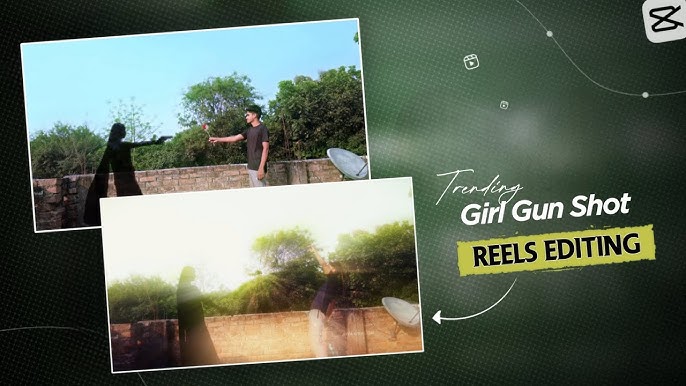
In 2025–2026, Girl Gun Shot videos have become a viral trend on Instagram Reels, TikTok, and YouTube Shorts. These short cinematic clips feature a powerful female character performing a dramatic gun-shot action using VFX effects, slow motion, camera shake, muzzle flash, and sound design—all created safely through editing apps.
If you’re a content creator, video editor, or beginner who wants to ride this trend and grow views, this complete guide will show you how to create a professional Girl Gun Shot video using only your phone or PC, with zero real weapons.
What Is a Girl Gun Shot Video?
A Girl Gun Shot Video is a short cinematic reel where:
- A girl performs a gun-shooting action pose
- The gun is added digitally (PNG or 3D effect)
- Muzzle flash, smoke, bullet shell, camera shake, and sound effects are added in post-production
- The final output looks cinematic, intense, and viral
These videos are purely visual effects–based and are meant for entertainment, storytelling, and creative expression.
Why Girl Gun Shot Videos Go Viral
Here’s why this trend works so well on social media:
- 🔥 Strong female action aesthetic
- 🎬 Cinematic Hollywood-style visuals
- ⏱ Perfect for short-form platforms (7–12 seconds)
- 🔊 High-impact sound effects
- 💥 Eye-catching VFX moments in first 2 seconds
When executed properly, these videos get high watch time, shares, and saves.
Tools You Need to Create a Girl Gun Shot Video
Mobile Apps (Beginner Friendly)
- CapCut (Highly recommended)
- Alight Motion
- VN Editor
- KineMaster
PC Software (Advanced Users)
- Adobe After Effects
- Premiere Pro
- DaVinci Resolve
Assets Required
- Gun PNG (transparent background)
- Muzzle flash effect
- Smoke overlay
- Bullet shell animation
- Gunshot sound effect
- Camera shake preset
Step 1: Shoot the Base Video (Most Important Part)
Before editing, you need a clean base clip.
How to Shoot the Video
- Use a smartphone or DSLR
- Vertical format (9:16)
- Record in 60fps (for smooth slow motion)
- Plain or dark background works best
- Natural light or soft ring light
Action Pose Tips
- Girl raises hand like holding a gun
- Slight body movement
- Sharp facial expression (confidence, power, intensity)
- Small recoil movement after “shot”
⚠️ Do not use real weapons or realistic props. Hand gestures are enough.
Step 2: Import Video into CapCut
- Open CapCut
- Create New Project
- Import your base video
- Set project ratio to 9:16
- Trim clip to 7–10 seconds
Shorter videos perform better on Reels and TikTok.
Step 3: Add Gun PNG Overlay
- Download a gun PNG (transparent background)
- Tap Overlay → Add Overlay
- Import gun PNG
- Resize and align it with the hand
- Use Keyframes to follow hand movement
Pro Tip
Zoom in and align frame-by-frame for realistic tracking.
Step 4: Add Muzzle Flash Effect
This is where the magic starts.
How to Add Muzzle Flash
- Import muzzle flash video/PNG as overlay
- Place it exactly at the gun’s barrel
- Duration: 0.1–0.2 seconds only
- Set Blend Mode: Screen or Lighten
- Add slight blur if needed
Less duration = more realistic.
Step 5: Add Smoke Effect
Smoke adds cinematic depth.
- Add smoke overlay
- Reduce opacity to 40–60%
- Use blend mode Screen
- Add slight slow motion
- Position it near gun barrel
This gives a Hollywood-style effect.
Step 6: Camera Shake Effect (Very Important)
Without camera shake, the shot feels fake.
How to Add Camera Shake in CapCut
- Select main video
- Add keyframes
- Slight left-right movement for 2–3 frames
- Or use built-in Camera Shake effect
Keep it subtle. Over-shaking ruins realism.
Step 7: Add Gun Shot Sound Effect
Sound design is 50% of realism.
Best Practices
- Use high-quality gunshot SFX
- Place sound exactly at muzzle flash frame
- Add bass boost if possible
- Reduce background noise
Optional:
- Add bullet shell drop sound
- Add echo or reverb for cinematic feel
Step 8: Add Color Grading & Cinematic Look
Color grading makes your video stand out.
Recommended Settings
- Increase contrast
- Lower highlights
- Slight teal & orange tone
- Reduce saturation slightly
- Add vignette
CapCut filters like Cinematic, Moody, or Dark Action work well.
Step 9: Slow Motion & Speed Ramps
Slow motion adds drama.
- Keep action at normal speed
- Slow down muzzle flash moment slightly
- Use speed ramp if available
This increases watch time and impact.
Step 10: Final Export Settings
Best Export Settings for Reels & TikTok
- Resolution: 1080×1920
- FPS: 30 or 60
- Bitrate: High
- Format: MP4
- HDR off (for compatibility)
Viral Caption Ideas for Girl Gun Shot Video
- “She doesn’t miss 🔥”
- “Power isn’t loud, it’s lethal 💥”
- “Cinematic vibes only 🎬”
- “Girls with vision hit harder 👑”
- “This shot took me hours 💀”
Prompt:
Cinematic 4K action scene, hyper-realistic, with immersive and high-quality audio.Visuals: A sleek, dark-colored car (like a black or deep grey sedan, similar to the image provided) is stopped on a dimly lit, empty asphalt road under a night sky, with faint streetlights in the distance. The man, who strongly resembles the person in the reference image you provided, exits the driver’s side. The woman, elegantly dressed (similar to the red attire in the image), exits the passenger side. As the man turns away, the woman suddenly pulls out a handgun. She aims and fires at the man.Camera & Lighting: The scene is shot with dramatic, low-key lighting, emphasizing shadows and highlights. A slight slow-motion effect is applied during the shooting sequence.Audio: Clear sound of car doors thudding shut. Subtle ambient night sounds. A sudden, sharp gunshot sound effect with a slight echo immediately followed by a dramatic thud as the man falls. A tense, low orchestral cinematic music score subtly swells during the shooting moment, then fades out.”
How to Make Your Video Stand Out
- Use storytelling (look → aim → shot)
- Unique outfit & styling
- Dramatic lighting
- High-quality sound design
- Perfect timing (first 2 seconds matter)
Final Thoughts
Creating a Girl Gun Shot Video is all about creative editing, cinematic timing, and powerful presentation—not real weapons. With apps like CapCut, anyone can create a viral action reel using simple overlays, sound effects, and camera shake.
If you practice alignment, sound timing, and color grading, your videos can easily compete with high-end edits and gain massive reach on Instagram, TikTok, and YouTube Shorts.
For More Information Visit