Ramadan is one of the most special times of the year for Muslims around the world. During this blessed month, people share greetings, duas, and beautiful visuals on social media platforms like Instagram, Facebook, and WhatsApp. One trend that has become extremely popular is creating Ramzan Mubarak 3D Pictures Boy using AI tools.
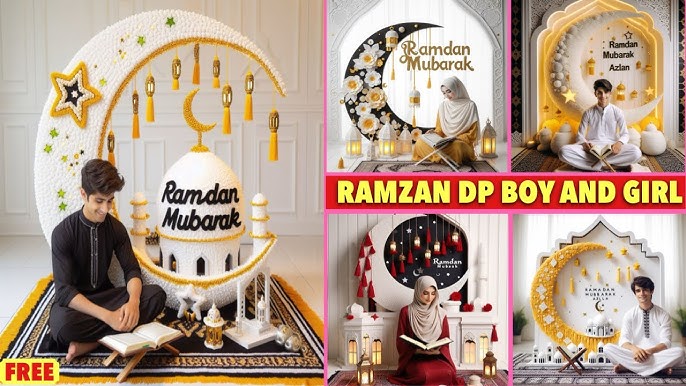
These images often show a stylish 3D boy character wearing traditional Islamic clothing, standing near a mosque, crescent moon, lanterns, or holding a Quran with glowing Ramadan lights in the background. These pictures are widely shared as profile photos, reels thumbnails, WhatsApp statuses, and greeting posts.
In this detailed guide, you will learn how to create Ramzan Mubarak 3D pictures of a boy step-by-step, even if you are a beginner with no design experience.
What Are Ramzan Mubarak 3D Pictures?
Ramzan Mubarak 3D pictures are AI-generated or digitally designed images featuring:
- A 3D boy character
- Ramadan elements (mosque, moon, lanterns, stars)
- Islamic clothing such as kurta, cap, or thobe
- A greeting message like “Ramzan Mubarak”
These images are designed with cinematic lighting, vibrant colors, and modern 3D style, making them perfect for social media sharing.
Creators often customize them with:
- Their name
- Profile photo style characters
- Personalized greetings
This makes the images feel more personal and unique.
Why Ramzan Mubarak 3D Boy Images Are Trending
There are several reasons why these images are trending online.
1. Personalized Greetings
People love sending greetings that include their name or avatar.
2. Eye-Catching Design
3D images stand out more than normal photos.
3. Perfect for Social Media
They look great on:
- TikTok
4. Easy to Create With AI
Modern AI tools can generate professional images in seconds.
5. Viral Potential
Creative Ramadan content spreads quickly during the holy month.
Best Tools to Create Ramzan Mubarak 3D Pictures
You don’t need advanced software. These tools make the process simple.
AI Image Generators
1. Bing Image Creator / DALL·E
Great for beginners and free to use.
2. Leonardo AI
Produces high-quality cinematic images.
3. Midjourney
Best for professional and realistic 3D visuals.
4. Playground AI
Easy prompt-based image generation.
Mobile Editing Apps
If you want to edit your image further:
- CapCut
- PicsArt
- Canva
- Remini
These apps allow you to add glow effects, text, and Ramadan elements.
Step-by-Step Guide to Create Ramzan Mubarak 3D Pictures Boy
Let’s go through the full process from start to finish.
Step 1: Decide Your Character Style
First decide what type of character you want.
Examples:
• Cute cartoon boy
• Realistic 3D Muslim boy
• Stylish Islamic avatar
• Anime-style Muslim boy
Also choose clothing style like:
- White kurta
- Black thobe
- Traditional cap
- Arabic dress
This will help you create a clear AI prompt.
Step 2: Write the Perfect AI Prompt
The quality of your image depends heavily on the prompt you write.
Here is an example prompt:
Example Prompt
A cute 3D Muslim boy wearing a white kurta and Islamic cap standing in front of a beautiful glowing mosque, crescent moon in the sky, Ramadan lanterns, night atmosphere, soft golden lights, ultra detailed, 3D cartoon style, cinematic lighting, Ramzan Mubarak theme, high quality.
This type of prompt helps the AI understand exactly what you want.
Step 3: Generate the Image
Open your AI generator and paste your prompt.
Steps usually include:
- Enter the prompt
- Select image size
- Choose style (3D / cinematic / cartoon)
- Generate image
Within seconds, the AI will create multiple versions.
Choose the one you like most.
Step 4: Customize the Character
Now you can personalize the image.
You can change:
- Clothes color
- Background lighting
- Character pose
- Mosque design
- Night sky effects
If the first result isn’t perfect, slightly adjust your prompt and generate again.
Step 5: Add Ramadan Elements
To make the image more festive, include Ramadan elements like:
• Crescent moon
• Mosque silhouette
• Lanterns (Fanous)
• Stars
• Quran
• Prayer mat
• Dates and iftar table
These elements help convey the Ramadan mood.
Step 6: Add “Ramzan Mubarak” Text
After generating the image, you can add greeting text.
Apps like Canva or PicsArt allow you to add stylish fonts.
Popular text ideas:
Ramzan Mubarak
Ramadan Kareem
Blessed Ramadan
Ramadan Wishes
Use glowing gold or white fonts to match the theme.
Prompt:
Create a super-realistic, ultra-sharp 16K image using my exact reference face without any alteration – facial structure, proportions, and expressions remain 100% unchanged. A slender 18-year-old boy sits gracetully inside a large illuminated crescent Decorative moon sculpture, adorned with soft neon-style lights. The composition is center-focused, balanced, and elegant. He is wearing a traditional loose full-pleated shalwar kameez in soft neutral tones, creating a clean and elegant appearance. He gently holds a lit Ramadan lantern, smiling softly and naturally while looking directly at the camera. The pose feels relaxed, calm, and refined. Face & skin details: Natural clean white skin tone Soft pinkish lips (natural) Realistic texture, no smoothing, no beautification Hair (if visible): glossy black hair with natural flow and movement, responding to gravity and motion, ultra-realistic shine Lighting & colors: Soft dreamy pink and white ambient lighting, smooth diffusion Cool-neutral highlights — no warm or golden light Subtle rim illumination around the silhouette for depth Colors rich but controlled, no oversaturation, premium cinematic realism Background: Minimalistic and aesthetic to enhance the crescent sculpture On the wall behind him, add the text/logo “رمضان المبارك” in elegant calligraphy Shallow depth of field, ultra-HD realism, luxury cinematic finishPeaceful, calm Ramadan mood.
Step 7: Enhance With Effects
To make the image more professional, add:
Glow effects
Light rays
Soft blur
Color grading
Shadow highlights
This will give the image a premium 3D look.
Step 8: Export in High Quality
Export the image in high resolution.
Recommended settings:
Resolution: 1080×1080 or higher
Format: PNG or JPG
Quality: Maximum
High resolution helps your image look sharp on social media.
Best AI Prompt for Ramzan Mubarak 3D Boy
Here are some ready-to-use prompts.
Final Thoughts
Creating Ramzan Mubarak 3D Pictures Boy is easier than ever thanks to AI tools. With the right prompt, creativity, and editing touches, you can generate stunning Ramadan images in minutes.
These images are perfect for:
• Social media posts
• Greeting messages
• Profile pictures
• Reels thumbnails
• Ramadan content pages
Experiment with different styles, prompts, and lighting to create something unique.
Ramadan is a time of sharing blessings, and creative visuals are a wonderful way to spread positivity and joy
For More Information Visit