In today’s digital world, your Instagram profile is more than just a social account — it is your online identity. Whether you are a creator, gamer, influencer, editor, entrepreneur, or student, having a stylish and professional Instagram profile poster can instantly make your profile stand out.
One of the biggest trends right now is creating AI Instagram Profile Posters. These posters combine artificial intelligence, cinematic editing, stylish typography, and modern aesthetics to create eye-catching profile designs that look premium and professional.
The best part? You no longer need advanced graphic design skills or expensive software. With modern AI tools, anyone can create stunning Instagram profile posters in minutes.
In this complete guide, you will learn how to create AI Instagram profile posters step by step, including:
- Best AI tools
- Prompt writing
- Poster design tips
- Mobile editing workflow
- SEO and social media optimization
- Viral Instagram strategies
Let’s begin.
What Is an AI Instagram Profile Poster?
An AI Instagram profile poster is a digitally designed poster created using AI image generation tools and editing apps. These posters usually include:
- A stylish portrait or AI avatar
- Instagram username
- Cinematic background
- Neon or glowing effects
- Modern typography
- Social media aesthetic
These posters are often used as:
- Instagram posts
- Profile banners
- Reels thumbnails
- Story highlights
- Promotion posters
- Personal branding visuals
AI tools make the process fast, creative, and beginner-friendly.
Why AI Instagram Profile Posters Are Trending
AI profile posters are becoming extremely popular for several reasons.
1. Professional Appearance
AI-generated posters look high quality and cinematic.
2. Strong Personal Branding
A stylish poster creates a memorable online identity.
3. Easy to Create
No need for Photoshop expertise.
4. Viral Potential
Creative posters receive more engagement.
5. Works for Every Niche
Perfect for:
- Gamers
- Editors
- Influencers
- Businesses
- Students
- Fashion creators
Best Platforms to Use AI Instagram Profile Posters
These posters perform well on:
- TikTok
- YouTube Community Posts
- WhatsApp Channels
Instagram remains the best platform for this trend.
Tools Needed to Create AI Instagram Profile Posters
You only need a few simple tools.
AI Image Generation Tools
These tools generate portraits and backgrounds.
1. Midjourney
Best for cinematic realism.
2. Leonardo AI
Excellent for stylish portraits.
3. Bing Image Creator
Free and beginner-friendly.
4. Playground AI
Simple and flexible.
Mobile Editing Apps
These apps help customize the poster.
- Canva
- PicsArt
- Lightroom Mobile
- CapCut
- Snapseed
Most creators use Canva and PicsArt together.
Optional AI Enhancement Tools
To improve image quality:
- Remini
- AI Upscaler
- Face enhancement tools
These apps sharpen and clean AI images.
Step-by-Step Guide to Create AI Instagram Profile Poster
Follow this full workflow carefully.
Step 1: Decide Your Poster Style
Before generating anything, choose your style.
Popular Instagram poster styles:
- Dark aesthetic
- Neon cyberpunk
- Luxury lifestyle
- Gaming profile poster
- Minimal modern design
- Anime-inspired poster
- Cinematic portrait poster
A clear style creates a stronger identity.
Step 2: Choose Your Character or Profile Image
You can use:
- Your real photo
- AI-generated avatar
- Cartoon version
- Anime version
- 3D character
Most creators prefer AI-enhanced portraits because they look futuristic and premium.
Step 4: Generate Multiple Variations
Never use only one generated image.
Generate:
- Different poses
- Different lighting
- Different backgrounds
Choose the image with:
- Sharp details
- Balanced composition
- Strong visual impact
This gives you better creative control.
Step 5: Remove or Clean Background
A clean background improves poster quality.
Use:
- Canva background remover
- PicsArt cutout tool
- AI background remover
You can replace the background with:
- Neon city
- Gradient glow
- Abstract shapes
- Gaming setup
- Luxury interiors
Step 6: Add Instagram Branding Elements
Now make the poster look social-media themed.
Add:
- Instagram logo
- Username
- Followers count style
- Social icons
- Stylish typography
Do not overcrowd the design.
Minimal and clean layouts work best.
Step 7: Add Cinematic Lighting Effects
Lighting creates the premium feel.
Popular effects:
- Neon glow
- Light streaks
- Lens flare
- RGB lighting
- Shadow gradients
Use these effects subtly.
Too much glow can ruin realism.
Step 8: Add Typography
Typography is critical in poster design.
Use bold modern fonts.
Popular text ideas:
- Your Instagram username
- “Content Creator”
- “Video Editor”
- “Digital Artist”
- “Gaming Creator”
Keep text readable and stylish.
Step 9: Add Depth and Shadows
Professional posters use depth.
Techniques:
- Background blur
- Soft shadows
- Layer separation
- Light contrast
These make the design feel cinematic.
Step 10: Enhance Image Quality
Use AI enhancement tools like:
- Remini
- Upscale.media
- Lightroom sharpening
This improves:
- Face details
- Texture
- Clarity
- Sharpness
High-quality visuals perform better online.
Step 11: Export in High Resolution
Best export settings:
- Resolution: 1080×1350
- PNG format
- Maximum quality
For stories:
- 1080×1920
Always export at the highest quality.
How to Create AI Instagram Posters on Mobile Only
You can do everything using your phone.
Mobile Workflow:
- Generate image using AI tool
- Enhance in Remini
- Edit in Canva or PicsArt
- Add text and effects
- Export and upload
This workflow is perfect for beginners.
Best Colors for Instagram Profile Posters
Color psychology matters.
Popular combinations:
- Black + Red
- Purple + Blue
- Gold + Black
- White + Neon Cyan
- Dark Grey + Orange
Choose colors that match your personality.
How to Make Your AI Poster Look Professional
Professional designs focus on:
- Simplicity
- Strong lighting
- Balanced spacing
- Sharp quality
- Consistent colors
Less clutter = more premium look.
Common Mistakes Beginners Make
Avoid these mistakes.
Overusing Effects
Too many effects reduce quality.
Low Resolution
Blurry images look unprofessional.
Weak Typography
Bad fonts ruin poster aesthetics.
Too Many Colors
Stick to 2–3 main colors.
Prompt:
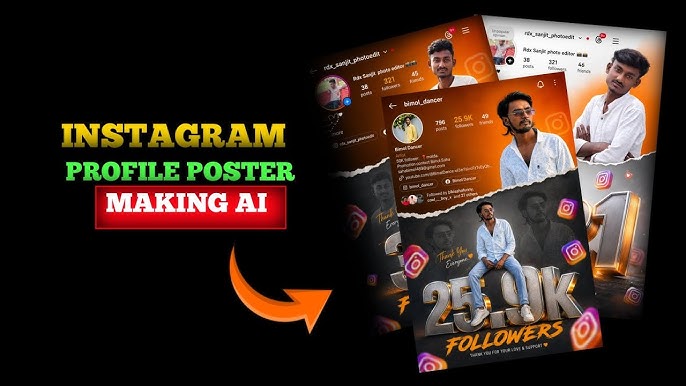
Ultra realistic Instagram milestone celebration poster design. A stylish Indian teenage boy wearing black sunglasses, black-white check shirt, blue jeans and white sneakers. Two different poses of the same person – one upper-body stylish portrait looking sideways at the top right, and one full-body sitting pose on giant metallic 3D “19K” text at the bottom center. Bright orange cinematic gradient background on top with smoky dark grey background at bottom separated by torn paper effect. Include realistic Instagram profile Ul on left side with username, followers count, reels creator details, bio text and social icons. Add floating 3D Instagram logos around the scene with depth blur. Add glowing orange sparks, cinematic lighting, dramatic shadows, high contrast, ultra HD 8K quality, realistic skin texture, DSLR depth of field, stylish influencer vibe. The giant “19K” text should look metallic steel with orange glowing edges and circular platform below it. Add “FOLLOWERS” text below. Add handwritten signature style.
Better prompts create better images.
SEO Tips for AI Instagram Poster Content
If you’re publishing blogs or YouTube tutorials, SEO matters.
Use keywords like:
- AI Instagram profile poster
- Instagram AI poster tutorial
- AI poster design
- Instagram DP poster AI
Also optimize:
- Meta title
- Meta description
- Alt text
- Headings
SEO improves search rankings.
How Creators Are Making Money With AI Posters
Many creators now earn money through AI design services.
Ways to monetize:
- Selling custom posters
- Freelancing on Fiverr
- Instagram editing services
- Social media branding
- AI prompt packs
AI design has become a real online business opportunity.
Future of AI Social Media Design
AI technology is improving rapidly.
Future trends include:
- Animated AI posters
- Interactive profile banners
- AI-generated influencer branding
- Real-time AI design tools
- AI motion graphics posters
The creators who learn these skills now will have a major advantage.
Final Thoughts
Creating an AI Instagram Profile Poster is one of the easiest ways to build a strong and professional online identity in 2026.
With the right:
- AI tools
- Creative prompts
- Cinematic effects
- Typography
- Color grading
You can create posters that look premium, viral, and highly engaging.
For More Information Visit