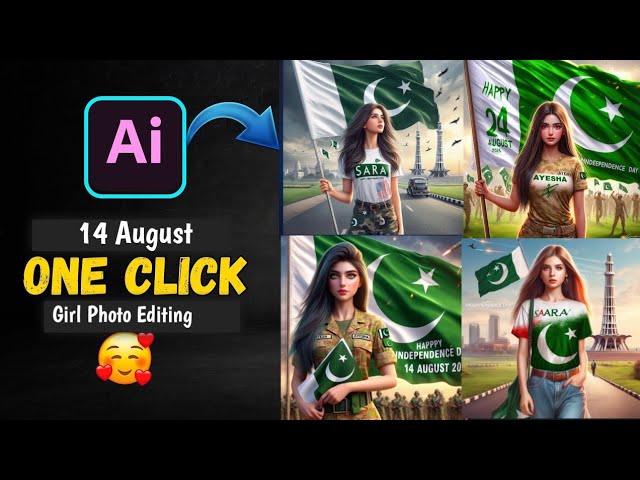
Pakistan’s Independence Day on 14 August is a time of immense national pride, unity, and celebration. Social media platforms light up with green and white flags, patriotic slogans, and beautiful 14 August-themed photos. But in 2025, there’s a new trend taking over — AI-generated 14 August photos.
Whether you want to turn your portrait into a Jashn-e-Azadi masterpiece, add Pakistani flags, or create AI photos wearing traditional green attire, you can do it all with free AI tools. This blog will guide you step-by-step on how to create AI 14 August photos, even if you have no technical skills.
✨ What Are AI 14 August Photos?
AI 14 August photos are images generated using Artificial Intelligence that reflect Pakistan’s Independence Day themes, such as:
-
Green & white color themes
-
National flag of Pakistan
-
Minar-e-Pakistan and Badshahi Mosque backgrounds
-
AI-generated outfits with crescent moon symbols
-
Fireworks and celebration effects
-
AI cartoon avatars holding flags
These images are unique, personalized, and often go viral on TikTok, Instagram, and Facebook during the month of August.
🔥 Why Are AI 14 August Photos Trending in 2025?
AI photo trends have exploded recently, especially during national festivals. Here’s why AI 14 August photos are becoming a social media sensation:
-
Uniqueness: Every photo is custom-made by AI.
-
No editing skills required: Just upload and generate.
-
Free & fast: Most tools are free to use.
-
High engagement: Perfect for viral reels and TikTok trends.
-
Celebrate digitally: Ideal for people living abroad who want to celebrate Pakistan’s Independence Day virtually.
🛠 Tools You Need to Create AI 14 August Photos
Before jumping into the tutorial, here are some popular and free tools you can use to create these AI-generated photos:
| Tool Name | Use Case | Free Version | Link |
|---|---|---|---|
| Remini AI | Photo enhancement & AI avatars | Yes | Remini App |
| Bing Image Creator | AI image generation using text prompts | Yes | Bing Image Creator |
| Leonardo AI | AI avatars and patriotic photo styles | Yes | leonardo.ai |
| PhotoRoom AI | Add Pakistan flag backgrounds | Yes | photoroom.com |
| Fotor AI | Convert photos to painting or festive style | Yes | fotor.com |
🧠 Step-by-Step: How to Create AI 14 August Photos
Let’s walk through different methods to create stunning AI-generated 14 August pictures.
✅ Method 1: Use Bing Image Creator (Free and Fast)
Step 1: Open Bing Image Creator
Visit: www.bing.com/images/create
Step 2: Write a Prompt Like:
Step 3: Click “Create”
Wait a few seconds. Bing will generate 4 unique images based on your prompt.
Step 4: Download Your Favorite Image
Click on the image, then download it for sharing on social media.
Bonus Tip:
Try different prompts like:
-
“Girl in green dress celebrating 14 August in Lahore”
-
“AI cartoon avatar with Pakistani flag and fireworks”
-
“Pakistani kid waving flag in AI-generated style”
✅ Method 2: Use Remini AI for 14 August Avatars
Remini is known for AI-enhanced avatars. Here’s how to use it for Azadi photos:
Step 1: Download the App
Search for “Remini AI” on Play Store or App Store.
Step 2: Upload Your Selfie
Choose a clear front-facing photo.
Step 3: Select AI Avatar
Tap on AI Avatar feature, and choose a style with patriotic or fantasy themes.
Step 4: Generate Your Avatar
You’ll see images with green outfits, flags, and creative styles — perfect for 14 August.
✅ Method 3: Use Leonardo.AI for Artistic Azadi Portraits
Step 1: Go to Leonardo.ai
Create a free account.
Step 3: Generate the Image
Click generate. It will take 20–30 seconds.
Step 4: Download & Edit (Optional)
You can enhance it in Canva or CapCut for further effects.
✅ Method 4: Use PhotoRoom AI for Flag Backgrounds
If you want your real photo with a 14 August background, try this method.
Step 1: Go to photoroom.com
Or download their mobile app.
Step 2: Upload Your Photo
Choose a selfie or portrait.
Step 3: Use “Background Replace”
Search for “Pakistan flag”, “14 August”, or “Minar-e-Pakistan” backgrounds.
Step 4: Save the Result
It gives a high-resolution result with green-white themes!
✅ Method 5: AI Painting Effect Using Fotor
Want your photo to look like a painted portrait for Jashn-e-Azadi?
Step 1: Go to fotor.com
Click “AI Photo to Art”.
Step 2: Upload Your Image
Use a clear close-up photo.
Step 3: Choose “Festival” or “Fantasy” Style
Apply a painting effect with celebration-style overlays.
Step 4: Save and Share
Add a green frame in Canva and share it on social platforms!
🖼️ 50+ Prompt Ideas to Generate AI 14 August Photos
Here’s a list of AI prompt ideas you can copy-paste in tools like Bing, Leonardo, or Midjourney:
-
Pakistani flag waving in wind, AI art
-
Boy standing in front of Minar-e-Pakistan, AI render
-
Cartoon girl in green dress celebrating Independence Day
-
Kids dancing with flags on 14 August
-
Pakistani truck art background with boy holding flag
-
Old man wearing green sherwani on 14 August
-
Fireworks in the sky above Lahore Fort
-
Girl wearing Jashn-e-Azadi makeup with moon and star
-
Patriotic theme with crescent moon and star design
-
14 August abstract digital background with flag
And 40 more prompts available upon request.
📱 How to Use Your AI 14 August Photos for Social Media
Once your AI photo is ready, here’s how to use it:
🟩 Instagram:
-
Add Jashn-e-Azadi filter or frame
-
Post as carousel with your favorite quotes
-
Use hashtags like:
#14August2025 #AzadiMubarak #PakistanZindabad
🟩 TikTok:
-
Create AI slideshow reels with Pakistani national songs
-
Add animations using CapCut
🟩 Facebook:
-
Set AI photo as profile or cover
-
Create “Happy Independence Day” posts
🧢 Bonus: Add Urdu Text and Quotes Using Canva
Want to write Urdu phrases like “پاکستان زندہ باد” on your AI photo?
Steps:
-
Open Canva.com
-
Upload your AI photo
-
Select Text Tool
-
Choose Urdu font like Noto Nastaliq Urdu
-
Add lines like:
-
پاکستان زندہ باد
-
جشن آزادی مبارک
-
ہم سب کا پاکستان
-
⚠️ Tips for Best Results
-
Always upload high-quality photos for the best AI output.
-
Use portrait mode selfies with good lighting.
-
Don’t wear glasses or cover your face for avatar generation.
-
Try multiple prompts with different variations.
-
Add Islamic calligraphy or crescent moon for extra charm.
🌍 For Overseas Pakistanis: Celebrate Digitally
Even if you live in USA, UK, UAE, Canada, or Australia, AI photos let you join the Azadi celebrations virtually. Post your customized 14 August AI photo with:
-
Digital fireworks
-
Pakistani monuments in the background
-
“Azadi Mubarak from London 🇬🇧” style captions
📈 How to Make It Viral (2025 Tips)
-
Add trending Azadi songs (like “Dil Dil Pakistan”) in Reels
-
Use CapCut templates with your AI photo
-
Join TikTok challenges like #AI14August
-
Post a before-after reel of real photo vs AI version
-
Collaborate with creators using the same AI style
Prompt:
“A beautiful 3D text design featuring the name ‘Ibrar’ in an elegant, sparkling font encrusted with green gemstones and outlined in silver. The design includes a shiny emerald-cut diamond above the ‘I’, the green and white flag of Pakistan waving above the name, and two detailed green butterflies fluttering nearby. The background is clean white, decorated with heart-shaped green and white pearls, diamonds, and soft sparkles. The entire scene is styled with a patriotic and festive Pakistani Independence Day theme, with elegant swirls in green and white flowing beneath the name.”
🛡️ Is It Safe to Use These AI Tools?
Yes, but follow these best practices:
-
Don’t upload sensitive images
-
Always read privacy policies
-
Prefer free tools that don’t require ID or credit card
-
Avoid NSFW prompts — keep it cultural and respectful
🎯 Conclusion: Celebrate 14 August 2025 With Creative AI Photos
Creating AI-generated 14 August photos is the most creative, fun, and modern way to express your love for Pakistan. Whether you want:
-
A portrait with the Pakistani flag
-
An AI painting of your child celebrating Azadi
-
A digital cartoon version of yourself in traditional dress
…there are free AI tools that make it all possible in just a few clicks.
For More Information Visit