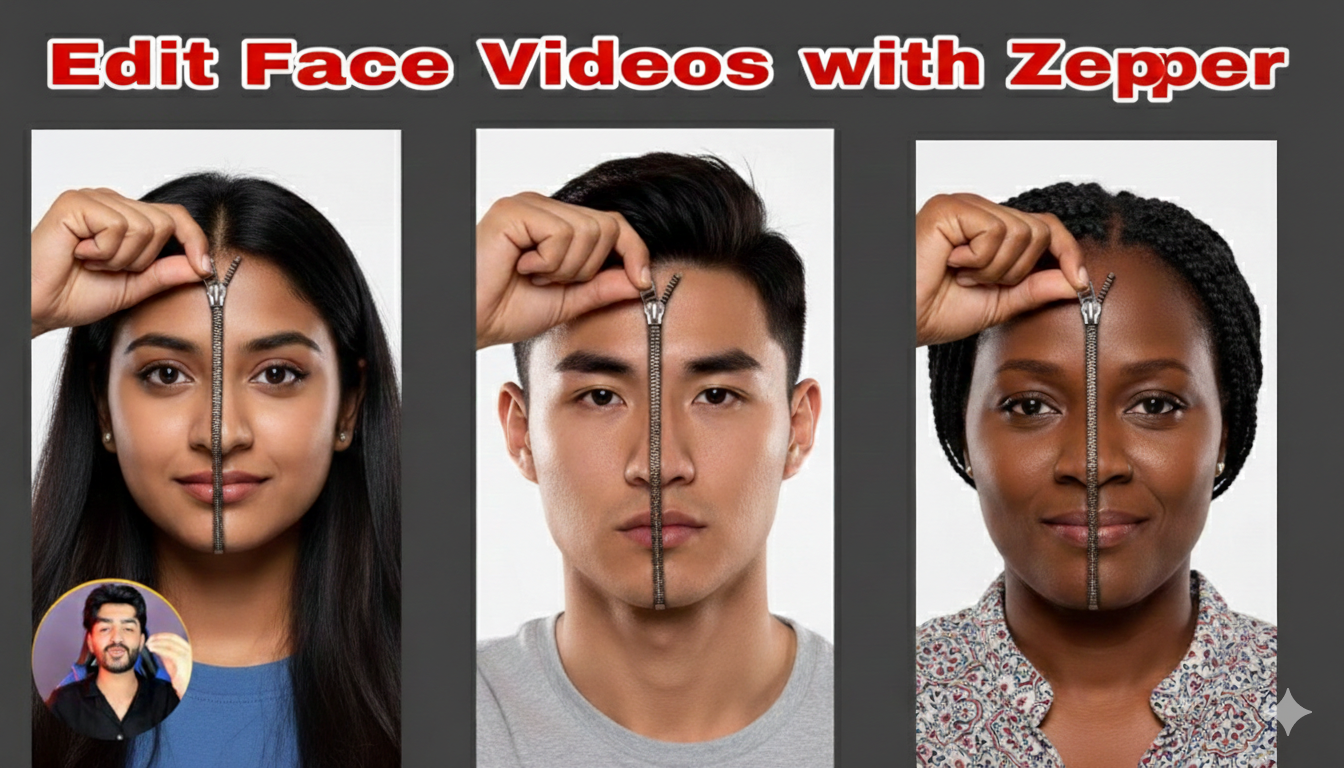
AI video trends are evolving rapidly, and one of the most eye-catching viral formats right now is the AI Zipping Face Video. You’ve probably seen it on Instagram Reels, TikTok, or YouTube Shorts — a face appears on screen, and suddenly a zipper effect runs across it, revealing a different face, character, style, or even a completely new personality underneath.
This visually dramatic transition captures attention instantly and keeps viewers watching until the end — which is exactly what social media algorithms love.
In this complete guide, you’ll learn how to create AI zipping face videos step by step, including tools, prompts, editing workflow, transitions, sound design, and optimization tips to help your content go viral.
What Is an AI Zipping Face Video?
An AI zipping face video is a short-form video where a zipper animation is placed on a person’s face, and when it is “unzipped,” it reveals:
- A new face
- A different character
- An AI-generated version
- A fantasy transformation
- A monster or superhero version
- A glow-up version
- A hidden emotion or personality
This effect combines:
- AI face generation
- Layer masking
- Motion animation
- Realistic transition effects
- Sound design
The result is a highly satisfying and dramatic transformation video.
Why AI Zipping Face Videos Are Trending
There are several reasons this format is going viral:
1. Strong Hook
The zipper creates immediate curiosity. Viewers want to see what’s underneath.
2. High Retention
The transformation happens at the end, increasing watch time.
3. Emotional Impact
You can reveal:
- A “real self”
- A glow-up
- A villain side
- A fantasy character
4. AI Creativity
AI allows unlimited transformation styles without expensive makeup or CGI.
Platforms Where AI Zipping Face Videos Perform Best
These videos work especially well on:
- Instagram Reels
- TikTok
- YouTube Shorts
- Facebook Reels
Vertical format (9:16) is essential for maximum reach.
Tools Needed to Create AI Zipping Face Videos
You don’t need expensive software. Here are the best tools:
AI Face Generation Tools
- Midjourney
- Leonardo AI
- DALL·E
- Bing Image Creator
AI Video & Animation Tools
- Runway ML
- Pika Labs
- Kaiber AI
Video Editing Apps (Beginner Friendly)
- CapCut (Highly Recommended)
- VN Video Editor
- Alight Motion
Professional Software
- Adobe After Effects
- Premiere Pro
- DaVinci Resolve
For beginners, CapCut + AI image generator is more than enough.
Step-by-Step Guide: How to Create AI Zipping Face Videos
Step 1: Record or Select a Clear Face Photo/Video
Start with:
- A front-facing portrait
- Good lighting
- Neutral expression
- High resolution
Make sure the face is centered.
Tip: Use soft lighting and avoid harsh shadows for better AI blending.
Step 2: Generate the “Underneath” Face Using AI
Now create the transformation version.
Examples:
- Cyberpunk version
- Demon version
- Superhero version
- Older/younger version
- AI robotic version
- Fantasy warrior version
Example AI Prompt:
“Ultra realistic cyberpunk version of a young man, glowing neon eyes, futuristic armor, cinematic lighting, 4K, detailed face, dramatic shadows”
Download the generated image in high resolution.
Step 3: Import Both Images into Your Editor
Open CapCut (or preferred editor):
- Create new project
- Set aspect ratio to 9:16
- Add original face as base layer
- Place AI face above it
Align both faces properly so they match.
Step 4: Add the Zipper PNG or Overlay
Search for:
- “Zipper PNG transparent”
- “Zipper overlay animation”
- “Green screen zipper effect”
Import zipper file and place it over the face.
Position it:
- Vertical center
- Diagonal for dramatic effect
- Across the mouth
- Across the eye
Step 5: Use Masking to Create the Reveal Effect
This is the key step.
- Select top AI face layer
- Use mask tool
- Adjust mask shape
- Animate mask using keyframes
- Sync mask movement with zipper motion
As the zipper moves, reveal the AI face underneath.
Make it smooth and realistic.
Step 6: Add Realistic Motion
Static edits look fake. Add:
- Slight camera zoom
- Light shake
- Subtle face movement
- Motion blur during unzip
Small details increase realism dramatically.
Step 7: Add Sound Effects
Sound makes the effect powerful.
Use:
- Zipper sound effect
- Whoosh
- Bass drop
- Dark cinematic impact
Sync the zipper pull with the sound.
Perfect audio timing increases retention.
Step 8: Add Color Grading
Enhance the final look:
For dramatic effect:
- Increase contrast
- Add cinematic LUT
- Slight blue/orange tones
For horror transformation:
- Add dark shadows
- Reduce saturation
- Add glow to eyes
Keep it clean and not overdone.
Step 9: Add Text (Optional)
If needed, add minimal text:
Examples:
- “My Real Side”
- “Hidden Power”
- “Unleashed”
- “Who I Really Am”
Use bold animated fonts.
But avoid too much on-screen text.
Step 10: Export with Best Settings
Use:
- 1080×1920 resolution
- 30fps or 60fps
- MP4 format
- High bitrate
Prompt For Image 1 :
Generate an Ultra-realistic studio portrait of the uploaded person, front view, perfectly centered composition. His left hand is raised and positioned at the top of his head, fingers gripping the zipper slider as if about to pull it down. A realistic metallic zipper runs vertically through the center of the face, from the forehead to chin in downward. The zipper is completely closed, with the slider at the top of the forehead. The emotion matches the reference photo: neutral facial expression, direct eye contact with the camera. shoulders and upper chest visible. keep remaining outfit same, Clean white studio background, soft cinematic lighting, hyper-realism, 8K, sharp focus, symmetrical face, dramatic concept art, photorealistic. The left arm is visible in frame, raised naturally to reach the top of the head. image aspect ratio – 9:16 .
Preview before uploading.
Best AI Zipping Face Video Ideas
Here are viral concepts:
- Normal face → Demon version
- Sad face → Confident version
- Human → Robot
- Casual person → Superhero
- Clean face → Horror monster
- Real face → Anime version
- Basic look → Glow-up luxury version
Prompt For Image 2:
Generate an Ultra-realistic studio upper body portrait of the uploaded person, front view, perfectly centered composition. Headshot framing – crop tight around the face, cutting off at mid-chest level. Minimal shoulder visibility. A realistic metallic zipper is fully closed and runs symmetrically along both sides of the lower part of the face, starting from the jawline and forming a V-shape under the chin. The zipper pull is positioned exactly under the chin and is held with fingers. Direct eye contact with the camera. shoulders and upper chest visible, Clean white studio background, person outfit remain same, soft cinematic lighting, hyper-realism, 8K, sharp focus, symmetrical face, dramatic concept art, photorealistic. image aspect ratio – 9:16
Creativity is unlimited.
How to Make AI Zipping Face Videos Go Viral
1. Hook in First 2 Seconds
Start with:
- Close-up face
- Suspense music
- Zoom effect
2. Keep Video Short
5–8 seconds performs best.
3. Use Trending Audio
Check Instagram and TikTok trending sounds.
4. Focus on Emotion
Transformation should feel meaningful.
5. Post Consistently
Consistency builds algorithm trust.
Video Prompt:
A single continuous cinematic shot. Static camera, front-facing portrait, centered composition. A realistic metal zipper is placed vertically in the center of the face, starting at the forehead. The person pulls the zipper down with her right hand. As the zipper moves downward, the upper layer of the face is gradually peeled away/removed, revealing a second face underneath in real time. The transformation happens strictly along the zipper line, perfectly synchronized with the zipper movement – the face underneath is only visible in the areas where the zipper has passed. No cuts. No camera movement. No jump cuts. Smooth, fluid motion. Ultra-realistic skin texture, photorealistic look, cinematic lighting, white studio background. shoulders and upper chest visible.
Common Mistakes to Avoid
- Poor face alignment
- Low resolution AI image
- Overuse of effects
- Bad zipper positioning
- No sound sync
- Too long intro
Clean execution beats complex editing.
SEO Tips for Ranking AI Zipping Face Content
If you’re publishing on blog or YouTube:
Include keywords like:
- AI zipping face video
- Zipper face transition
- AI face transformation tutorial
- How to unzip face effect
- Viral AI face edit
Optimize:
- Title
- Meta description
- Image alt text
- Video tags
Why AI Zipping Face Videos Are the Future
AI-powered transformation content is growing because:
- It requires no physical makeup
- No expensive CGI
- No professional studio
- Just creativity + AI tools
In the future, AI face animation will become even more realistic, making this trend bigger.
Creators who master it early will benefit the most.
Final Thoughts
Creating an AI Zipping Face Video is one of the most powerful ways to grab attention in 2026. With the right AI tools, smart masking, clean transitions, and dramatic sound design, you can produce scroll-stopping content in minutes.
Remember:
- Keep it short
- Focus on transformation impact
- Sync sound perfectly
- Don’t over-edit
- Stay consistent
The zipper effect isn’t just a trend — it’s a storytelling tool. Use it creatively, and you can build a strong visual identity across social media platforms.
For More Information Visit