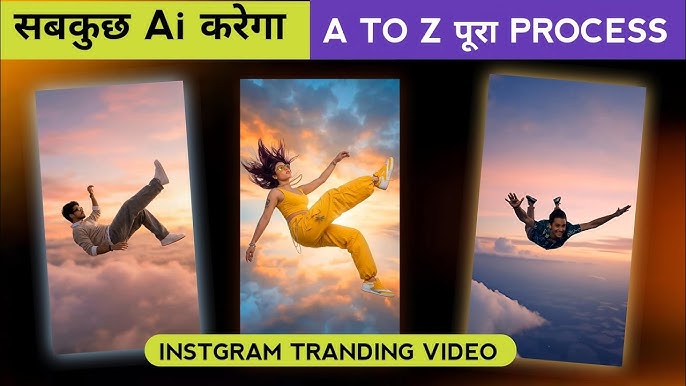
AI video creation has completely transformed the way creators produce cinematic content for YouTube Shorts, Instagram Reels, TikTok, and even films. One of the most viral and visually powerful trends right now is the AI Sky Fall Video — a dramatic effect where a character appears to fall from the sky, clouds, or space in a cinematic, slow-motion style.
In this detailed guide, you will learn how to create an AI Sky Fall video from scratch, even if you have no advanced editing skills. We will cover tools, prompts, editing techniques, storytelling tips, common mistakes, and SEO strategies to make your video go viral.
What Is an AI Sky Fall Video?
An AI Sky Fall video is a cinematic short video where a person, character, or superhero is shown falling from the sky using AI-generated visuals, motion effects, and realistic physics simulation.
These videos often include:
- Falling through clouds or sky
- Slow-motion gravity effects
- Cinematic lighting and motion blur
- Dramatic music
- Superhero, motivational, or cinematic storytelling
AI Sky Fall videos are popular because they:
- Look high-budget
- Are easy to create using AI tools
- Perform extremely well on short-form platforms
Why AI Sky Fall Videos Are Trending in 2025
The rise of AI video tools like Runway, Pika Labs, Kaiber, CapCut AI, and Gemini Veo has made cinematic effects accessible to everyone.
Key Reasons for the Trend:
- High visual impact in the first 3 seconds
- Perfect for short-form content
- AI handles motion, lighting, and realism
- Strong emotional storytelling
- Works for superheroes, motivation, fantasy, and action niches
Types of AI Sky Fall Videos
Before creating your video, decide the style you want.
1. Cinematic Sky Fall
- Realistic clouds
- Movie-style camera
- Dramatic lighting
2. Superhero Sky Fall
- Characters like Hulk, Iron-Man-style heroes
- Power aura, lightning, energy effects
3. Motivational Sky Fall
- Person falling and rising
- Voiceover with inspirational dialogue
4. Anime or Fantasy Sky Fall
- Anime characters
- Magical skies
- Stylized effects
Tools Required to Create an AI Sky Fall Video
You don’t need all tools — choose based on your workflow.
AI Video Generation Tools
- Runway Gen-3
- Pika Labs
- Kaiber AI
- Gemini Veo
- Luma AI
Editing Tools
- CapCut (Mobile/Desktop)
- Adobe After Effects
- DaVinci Resolve
Audio Tools
- ElevenLabs (AI Voice)
- YouTube Audio Library
- Epidemic Sound
Step-by-Step: How to Create an AI Sky Fall Video
Step 1: Create or Select Your Character
You can:
- Use your own photo
- Use an AI-generated character
- Use a superhero or cinematic avatar
Tip: A full-body image works best.
Step 2: Write a Strong Sky Fall Prompt
Your prompt controls everything. Here’s a high-quality AI Sky Fall prompt example:
Prompt Example (English):
A cinematic 4K scene of a muscular character falling from the sky through thick clouds, slow motion, realistic gravity, dramatic lighting, volumetric clouds, cinematic camera movement, ultra-realistic details, epic atmosphere, motion blur, high contrast lighting, realistic sky physics
Adjust based on:
- Character type
- Mood
- Camera angle
- Speed of fall
Step 3: Generate the Sky Fall Clip Using AI
Upload your image or use text-to-video.
Settings to use:
- Resolution: 4K or 1080p
- Frame rate: 24 or 30 FPS
- Motion strength: Medium to High
- Duration: 5–8 seconds
Generate multiple versions and select the best one.
Step 4: Import AI Clip into CapCut or Editing Software
Once the AI clip is ready:
- Open CapCut
- Create a new project
- Import the AI video
- Set aspect ratio:
- 9:16 (Shorts/Reels)
- 16:9 (YouTube)
Step 5: Enhance the Sky Fall Effect in CapCut
Now add cinematic polish.
Effects to Add:
- Motion Blur
- Camera Shake (subtle)
- Light leaks
- Clouds overlay
- Depth blur
Color Grading:
- Increase contrast
- Slightly reduce saturation
- Add cool tones (blue/gray)
Step 6: Add Sound Design and Music
Sound is 50% of impact.
Recommended Sounds:
- Wind rushing sound
- Low cinematic bass
- Rising whoosh effects
Music Style:
- Cinematic trailer music
- Slow build-up
- Epic climax
Step 7: Add Text or Dialogue (Optional)
For viral performance:
- Keep text minimal
- Add text in first 2 seconds
Examples:
- “Fall to Rise”
- “This is not the end”
- “Power awakens”
Advanced Tips for Viral AI Sky Fall Videos
1. Start With Action
Your first frame should already show falling motion.
2. Use Slow Motion
Speed: 0.6x – 0.8x works best.
1 Image Prompt: Ultra realistic cinematic scene of my me floating and falling in mid air above the clouds, dynamic upside down pose with legs bent and arms slightly raised, wearing black hoodie black pants black cap sunglasses and red sports shoes, dramatic sense of motion, two futuristic stealth fighter jets flying very close above and below the character with motion blur and heat trails, high altitude sky with soft clouds far below, daylight cinematic lighting, sharp focus on character, wide angle shot, epic scale, realistic physics, dramatic composition, 4k quality, no text, no logo, no watermark.
3. Add a Twist
End the video with:
- Character landing
- Power awakening
- Fade into light
2 Image Prompt: A cinematic wide low angle shot of a man floating high in the open sky mid air minimal composition subject very small in frame lots of empty sky soft natural daylight realistic motion blur ultra realistic photography shallow depth of field clean background no aircraft no objects dramatic scale feeling 8k high detail vertical frame.
4. Loop the Video
Perfect loops increase watch time.
Common Mistakes to Avoid
❌ Too fast falling
❌ Overusing effects
❌ Poor lighting
❌ Low-quality prompts
❌ No sound design
Video Prompt: A realistic professional photograph of a me as a motivational speaker delivering a speech at a formal indoor event. I am standing behind a wooden podium with a microphone, speaking with calm confidence and clarity. I am wearing a white solid kurta and minimal accessories. he is wearing subtle eyeglasses. The background shows a soft-focus seminar or conference hall with a motivational banner behind him (text not readable, blurred). Lighting is warm and professional, similar to auditorium stage lighting. The composition is mid-shot to waist-up, slightly angled from the side, cinematic depth of field. Ultra-realistic, DSLR photography, sharp focus, natural skin tones, professional corporate event vibe, 4K quality, shallow depth of field, no distortion, no cartoon, no illustration.
Best Platforms for AI Sky Fall Videos
- YouTube Shorts
- Instagram Reels
- TikTok
- Facebook Reels
SEO Optimization for AI Sky Fall Videos
SEO Keywords to Use:
- AI sky fall video
- sky fall AI effect
- cinematic AI video
- AI falling effect
- AI superhero video
Title Example:
How to Create AI Sky Fall Video | Cinematic AI Effect Tutorial 2025
Description Tips:
- Add tool names
- Mention “AI”, “4K”, “Cinematic”
- Use timestamps
Monetization Ideas
- YouTube Shorts revenue
- Brand collaborations
- AI editing services
- Sell CapCut templates
- Course or tutorials
Future of AI Sky Fall Videos
AI video technology is evolving rapidly. Soon:
- Real-time physics will improve
- Facial expressions will be more realistic
- Full cinematic movies will be AI-generated
Creators who start now will stay ahead.
Final Thoughts
Creating an AI Sky Fall video is no longer difficult or expensive. With the right AI tools, strong prompts, and basic editing skills, you can produce cinematic, viral-ready videos that look like movie scenes.
If you focus on:
- Story
- Motion
- Sound
- Visual quality
Your AI Sky Fall videos can easily stand out in 2025.
For More Information Visit