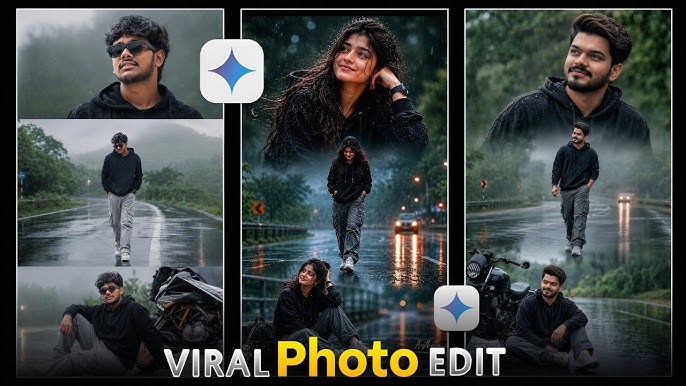
Monsoon photography has a unique charm. The combination of dark clouds, falling rain, reflective streets, and dramatic lighting creates breathtaking visuals. However, capturing the perfect monsoon photo in real life can be difficult due to weather conditions, equipment limitations, and timing.
Thanks to Artificial Intelligence (AI), anyone can now create stunning AI monsoon photos within minutes. Whether you’re a content creator, photographer, influencer, or digital artist, AI tools allow you to transform ordinary images into cinematic rainy-season masterpieces.
In this guide, you’ll learn how to create realistic AI monsoon photos step by step and discover tips to make them look professional and eye-catching.
What Are AI Monsoon Photos?
AI monsoon photos are digitally generated or AI-enhanced images that recreate the atmosphere of the rainy season. Using AI image generators and photo editing tools, users can add:
- Realistic rainfall effects
- Dark stormy clouds
- Wet roads and reflections
- Cinematic lighting
- Umbrellas and raincoats
- Fog and mist effects
- Dramatic monsoon backgrounds
The result is a highly realistic photo that looks like it was captured during a beautiful rainy day.
Why AI Monsoon Photos Are Trending
AI-generated monsoon images have become popular because they:
- Create professional-quality visuals instantly
- Enhance social media engagement
- Add a cinematic mood to portraits
- Save time compared to traditional editing
- Allow creativity without weather limitations
Many Instagram creators, YouTubers, and digital artists are using AI monsoon effects to create viral content.
Step 1: Choose an AI Photo Generator
Start by selecting a reliable AI image generation tool. Popular options include:
- ChatGPT Image Generation
- Midjourney
- Leonardo AI
- Adobe Firefly
- Ideogram
- Flux AI
These platforms can generate realistic monsoon scenes from simple text prompts.
Step 2: Upload Your Photo
For personalized AI monsoon portraits, upload a clear image with:
- Good lighting
- High resolution
- Visible facial features
- Simple background
The better the original photo quality, the more realistic the final AI result will be.
Step 3: Write a Detailed Monsoon Prompt
The quality of your AI monsoon photo depends heavily on the prompt.
Example Prompt
“Ultra-realistic cinematic monsoon portrait of a young person standing in heavy rain, dark storm clouds, wet reflective street, dramatic lighting, realistic water droplets on face, moody atmosphere, shallow depth of field, 4K photography, natural skin texture, professional color grading.”
Adding details about lighting, weather, clothing, and mood helps the AI generate more realistic results.
Step 4: Enhance the Rain Effects
To make your AI monsoon image stand out, include elements such as:
- Heavy rainfall
- Water splashes
- Rain droplets on skin
- Wet hair
- Puddles and reflections
- Thunderstorm clouds
- Mist and fog
These details add depth and realism to the image.
Step 5: Add Cinematic Lighting
Lighting is one of the most important factors in creating professional AI monsoon photos.
Try using:
- Golden street lights
- Blue storm lighting
- Soft ambient light
- Backlighting through rain
- Dramatic contrast
Cinematic lighting creates an emotional and visually appealing atmosphere.
Prompt:
Transform this image into a breathtaking ultra-realistic foggy forest masterpiece. Add dense natural white fog covering the entire environment, creating a mysterious and cinematic atmosphere. Apply rich forest-inspired color grading with deep emerald green, dark teal, moss green, and earthy brown tones. Enhance the trees, foliage, and background elements to resemble a lush enchanted forest hidden in the mist. Introduce soft volumetric light rays subtly penetrating through the fog, creating depth and realism. Increase overall image quality to ultra-high-definition 4K resolution with razor-sharp details, HDR enhancement, realistic textures, balanced contrast, and natural color harmony. Improve shadows, highlights, and dynamic range while maintaining a realistic appearance. Add a moody woodland aesthetic, dreamy fog layers, atmospheric perspective, and professional cinematic photography grading. The final result should look like a premium DSLR forest photograph ca
Include Camera Settings
Adding photography terms improves realism:
- 85mm lens
- f/1.8 aperture
- shallow depth of field
- DSLR quality
- 4K resolution
Focus on Mood
Describe emotions such as:
- Peaceful
- Romantic
- Dramatic
- Mysterious
- Cinematic
AI responds well to emotional context.
Experiment with Different Rain Intensities
Try:
- Light drizzle
- Moderate rainfall
- Heavy storm
- Thunderstorm effect
Each creates a unique visual style.
Common Mistakes to Avoid
Many beginners make these mistakes:
- Using very short prompts
- Uploading low-quality photos
- Overusing rain effects
- Ignoring lighting details
- Adding too many conflicting elements
Keeping prompts detailed and focused usually produces the best results.
Benefits of AI Monsoon Photography
AI monsoon photography offers several advantages:
- No need to wait for rainy weather
- Professional results in minutes
- Unlimited creative possibilities
- Ideal for social media content
- Cost-effective compared to traditional photoshoots
This makes AI-generated rainy-season photography accessible to everyone.
Conclusion
Creating AI monsoon photos is easier than ever. With the right AI tool, a quality source image, and a detailed prompt, you can generate stunning rainy-season portraits that look professionally photographed.
Whether you want cinematic street scenes, romantic rainy portraits, or dramatic storm visuals, AI allows you to bring your creative ideas to life without waiting for the perfect weather.
Start experimenting with AI monsoon prompts today and transform ordinary photos into breathtaking monsoon masterpieces.
For More Information Visit