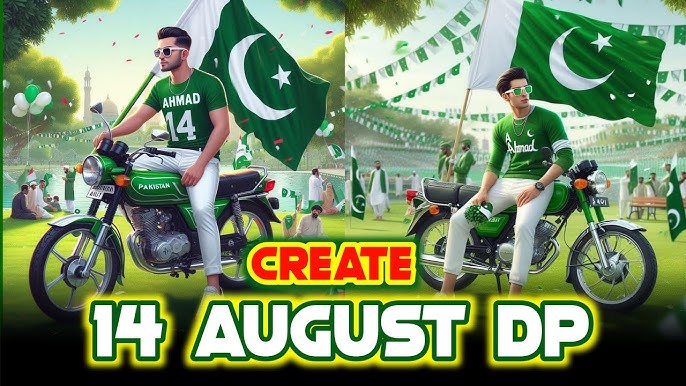
Pakistan’s Independence Day, celebrated on 14 August, is one of the most meaningful and exciting occasions of the year. Every year, people decorate their homes, wear green and white clothes, share patriotic messages, and upload creative pictures on social media. In recent years, AI photo editing has made it much easier to create unique 14 August photos without professional photography or advanced editing skills.
You can now turn an ordinary selfie into a beautiful AI 14 August photo featuring Pakistan’s green and white theme, the national flag, Minar-e-Pakistan, fireworks, patriotic backgrounds, traditional clothing, glowing effects, and cinematic lighting.
The best part is that you do not need to be a professional graphic designer. With an AI image generator or AI photo editor and the right prompt, you can create eye-catching Independence Day pictures in just a few minutes.
In this guide, you will learn how to make AI 14 August photos, which prompts to use, how to create realistic Pakistani Independence Day portraits, how to make social-media-ready images, and how to improve your final result.
What Are AI 14 August Photos?
AI 14 August photos are images created or transformed using artificial intelligence with themes related to Pakistan Independence Day.
For example, you can upload your portrait to an AI image editor and ask it to transform the image into a patriotic Independence Day portrait. The AI can add elements such as:
- Pakistan’s national flag
- Green and white clothing
- Minar-e-Pakistan
- Crescent and star designs
- Green glowing effects
- Fireworks
- Patriotic decorations
- Pakistani city backgrounds
- Green and white smoke
- Independence Day banners
- Cinematic lighting
- Traditional Pakistani outfits
Instead of manually cutting out your photo, finding backgrounds, adding objects, adjusting lighting, and creating effects, AI can perform much of the work automatically.
This makes AI Independence Day photo editing especially popular among Instagram, Facebook, TikTok, and WhatsApp users.
Why AI 14 August Photos Are Trending
Traditional photo editing can take a lot of time. You might need Photoshop or another editing application, knowledge of layers, masking, blending, color grading, and other techniques.
AI has changed this process.
You can simply describe the image you want using a text prompt. The AI attempts to create the scene according to your description.
For example, instead of manually designing an Independence Day poster, you can use a prompt like:
Create a realistic cinematic portrait of a young Pakistani man celebrating 14 August, wearing a stylish green and white traditional outfit, standing in front of Minar-e-Pakistan at night, Pakistan flags waving in the background, beautiful green and white fireworks, dramatic cinematic lighting, realistic skin texture, professional photography, ultra-detailed, patriotic atmosphere.
The result can look much more professional than a simple selfie.
Another reason AI 14 August photos are popular is that they are personalized. Everyone can create a different image based on their clothing, pose, location, and preferred style.
What You Need to Create AI 14 August Photos
You don’t need expensive equipment.
Usually, you need only three things:
1. A Good Photo
Choose a clear portrait or selfie.
For the best results:
- Use a high-resolution photo.
- Make sure your face is clearly visible.
- Avoid heavily blurred pictures.
- Use good lighting.
- Choose a photo where your face is not covered.
- A front-facing or slightly angled portrait usually works well.
2. An AI Image Generator or Editor
You can use an AI-powered image generation or editing service that supports image uploads and text prompts.
The exact steps can vary depending on the tool you use, but the basic workflow is usually:
Upload Photo → Enter Prompt → Generate → Review → Improve → Download
3. A Good AI Prompt
The prompt is one of the most important parts of the process.
A short prompt can work, but a detailed prompt usually gives you more control over:
- Clothing
- Background
- Pose
- Lighting
- Camera style
- Colors
- Mood
- Decorations
- Image quality
How to Make AI 14 August Photos Step by Step
Now let’s look at the complete process.
Step 1: Select Your Best Portrait
First, choose a photo that you want to transform.
Your original image doesn’t have to be a professional photograph. A smartphone selfie can work well if the face is visible and reasonably sharp.
Try to avoid:
- Very dark photos
- Extremely low-resolution images
- Photos with your face hidden
- Images with multiple people when you want a single-person portrait
- Photos with heavy filters
A clean image gives the AI more useful information.
Step 2: Open an AI Photo Editing Tool
Open an AI image editor or generator that supports photo uploading.
Look for an option such as:
Upload Image, Edit Image, Create Image, Image-to-Image, or Generate.
Upload your selected portrait.
Some tools may ask you to choose an editing mode before entering your prompt.
If available, choose an option designed for image editing or image-to-image generation rather than generating a completely new character.
Step 3: Add Your 14 August Prompt
After uploading your photo, enter a detailed prompt describing the image you want.
Here’s a simple prompt:
Transform this portrait into a realistic Pakistan Independence Day 14 August photo. Keep the person’s face and identity natural and recognizable. Add a beautiful green and white Pakistani Independence Day background, Pakistan flags, glowing lights, fireworks, cinematic lighting, realistic photography, high detail, professional portrait style.
Generate the image and check the result.
If the AI changes your face too much, modify your prompt.
Step 4: Tell AI to Preserve Your Face
One of the biggest problems with AI photo editing is that the generated person may look slightly different from the original.
To reduce this problem, clearly tell the AI to preserve your identity.
Try adding:
Preserve the person’s original facial features, face shape, hairstyle, skin tone, and identity. Do not change the facial structure.
You can combine this with your main prompt.
For example:
Create a realistic 14 August Independence Day portrait using the uploaded photo. Preserve the person’s original facial identity, facial structure, hairstyle, and natural appearance. Dress the person in an elegant green and white Pakistani outfit. Add Pakistan flags and beautiful green and white lights in the background. Include subtle fireworks and cinematic lighting. Professional photography, realistic skin texture, sharp details, natural proportions, high-resolution portrait.
Step 5: Generate the Image
Click the generate button and wait for the AI to process the image.
Depending on the tool, generation may take anywhere from a few seconds to several minutes.
Don’t worry if your first result isn’t perfect.
AI image generation often works best through experimentation.
You can modify the prompt and generate another version.
Step 6: Improve the Result
If the image looks good but needs some changes, don’t start over completely.
Instead, modify the prompt.
For example, if the background is too busy, write:
Keep the portrait simple and elegant. Reduce the number of background elements and keep the person’s face as the main focus.
If the clothing isn’t correct:
Change the outfit to a stylish white traditional Pakistani shalwar kameez with a green waistcoat.
If you want more patriotic elements:
Add subtle Pakistani flags, green and white decorative lights, and elegant Independence Day decorations.
Small prompt changes can significantly affect the final image.
Best AI 14 August Photo Prompts
Here are several ready-to-use prompts you can experiment with.
1. Realistic 14 August Portrait Prompt
Create a highly realistic Pakistan Independence Day portrait using the uploaded photo. Keep the person’s face, identity, facial structure, hairstyle, and natural skin tone unchanged. Dress the person in an elegant green and white Pakistani outfit. Place them in a beautiful Independence Day environment with Pakistan flags, green and white lights, subtle fireworks, and a patriotic atmosphere. Cinematic lighting, professional photography, realistic skin texture, sharp focus, natural proportions, high detail, premium portrait photography.
2. Minar-e-Pakistan AI Photo Prompt


Transform the uploaded portrait into a cinematic Pakistan Independence Day scene. Preserve the person’s original face and identity. Place the person standing confidently in front of Minar-e-Pakistan at night. Add large Pakistani flags waving in the background, green and white decorative lights, elegant fireworks in the sky, and a festive 14 August atmosphere. The person is wearing a stylish green and white Pakistani traditional outfit. Realistic photography, cinematic composition, natural skin texture, dramatic but realistic lighting, ultra-detailed, high-resolution portrait.
This prompt works particularly well if you want a recognizable Pakistani landmark in your image.
3. Pakistani Flag Portrait Prompt
Create a powerful patriotic 14 August portrait from the uploaded photo. Keep the person’s face completely natural and recognizable. Add a large Pakistan national flag waving behind the person with beautiful green and white lighting. The subject is wearing an elegant white traditional Pakistani outfit with green details. Add subtle glowing particles and soft Independence Day decorations. Professional studio photography, realistic skin texture, cinematic lighting, sharp focus, premium quality, natural facial proportions.
4. Green and White Fashion Portrait
Turn this photo into a stylish Pakistan Independence Day fashion portrait. Preserve the original face and identity. Dress the person in a modern elegant green and white Pakistani outfit with sophisticated styling. Use a luxurious green and white studio background decorated with Pakistan flags and soft glowing lights. Add cinematic shadows, professional fashion photography, realistic skin, natural facial details, sharp focus, high-end editorial style, high resolution.
This is a good option for people who want something modern rather than a traditional Independence Day poster.
5. 14 August Fireworks Photo
Create a realistic cinematic Independence Day portrait from the uploaded photo. Preserve the person’s original facial identity and appearance. Place the person outdoors at night with beautiful green and white fireworks illuminating the sky. Add Pakistani flags, glowing green lights, subtle smoke, and an elegant patriotic atmosphere. The subject is wearing a stylish green and white outfit. Professional DSLR photography, realistic skin texture, cinematic lighting, depth of field, sharp focus, ultra-realistic details, high-resolution image.
6. Traditional Pakistani 14 August Photo
Transform the uploaded portrait into a traditional Pakistani Independence Day photograph. Keep the original face and identity unchanged. Dress the person in a clean white shalwar kameez with a green waistcoat and a small Pakistan flag pin. Place them in a beautifully decorated outdoor setting with green and white flags, Independence Day decorations, soft lights, and a patriotic atmosphere. Natural daylight, realistic photography, authentic Pakistani style, detailed fabric texture, sharp facial details, professional portrait.
7. 14 August Boys Photo Prompt
Create a stylish and realistic 14 August portrait of the person in the uploaded photo. Preserve his exact facial identity and natural appearance. Dress him in a fashionable green and white Pakistani outfit with a small Pakistan flag accessory. Place him in front of an elegant Independence Day background featuring Pakistani flags, green and white lights, and subtle fireworks. Confident pose, cinematic lighting, realistic skin, professional photography, sharp focus, high detail, natural proportions, premium social media portrait.
8. 14 August Girls Photo Prompt
Create an elegant Pakistan Independence Day portrait using the uploaded photo. Preserve the woman’s original facial identity, facial features, hairstyle, and natural appearance. Dress her in a beautiful green and white Pakistani traditional outfit with elegant styling. Add Pakistan flags, green and white flowers, soft glowing lights, and a subtle festive Independence Day background. Professional portrait photography, natural skin texture, cinematic lighting, realistic details, sophisticated composition, high resolution.
9. Kids 14 August Photo Prompt
Create a cute and realistic Pakistan Independence Day portrait using the uploaded child’s photo. Preserve the child’s natural face and identity. Dress the child in a beautiful green and white Pakistani Independence Day outfit. Add small Pakistan flags, green and white decorations, soft lights, and a cheerful festive background. Natural expression, realistic skin, professional children’s photography, soft cinematic lighting, sharp details, joyful patriotic atmosphere, high-resolution image.
When creating images of children, use age-appropriate clothing and natural, family-friendly settings.
10. 14 August Poster-Style Photo
Create a professional Pakistan Independence Day poster using the uploaded portrait. Keep the person’s face realistic and recognizable. Place the person prominently in the center wearing an elegant green and white Pakistani outfit. Add Pakistan flags, green and white smoke effects, glowing particles, fireworks, and a beautiful patriotic background. Leave clean empty space at the top for the text “14 AUGUST” and at the bottom for “Happy Independence Day Pakistan.” Dramatic cinematic lighting, premium poster design, realistic photography, high resolution, sharp details.
How to Create a Cinematic 14 August AI Photo
If you want your image to look like a movie poster, focus on cinematic keywords.
Use terms such as:
- Cinematic lighting
- Dramatic composition
- Volumetric light
- Shallow depth of field
- Realistic skin
- Professional photography
- Film-like color grading
- High dynamic range
- Sharp subject
- Soft background
- Atmospheric lighting
Example:
Create a cinematic 14 August portrait of the uploaded person, preserving the original facial identity. Place the subject in a patriotic Pakistani Independence Day environment with green and white lights, Pakistan flags, glowing particles, and fireworks. Use dramatic cinematic lighting, shallow depth of field, realistic skin texture, natural facial proportions, professional DSLR photography, film-like composition, detailed clothing, high resolution.
How to Create a 14 August DP for WhatsApp or Facebook
If your goal is a profile picture, don’t make the background too complicated.
The face should remain clearly visible even when the image is displayed as a small circle.
Use a prompt like:
Create a square Pakistan Independence Day profile picture using the uploaded portrait. Preserve the person’s face and identity. Place the subject in the center wearing an elegant green and white outfit. Add a soft Pakistan flag background, subtle green glow, small Independence Day decorations, and cinematic portrait lighting. Keep the composition clean, face clearly visible, realistic photography, sharp details, high-resolution square image.
A 1:1 square composition is usually ideal for profile pictures.
How to Create 14 August Instagram Photos
Instagram posts can benefit from a more artistic composition.
For a portrait post, try:
Create a premium Instagram portrait for Pakistan Independence Day on 14 August. Preserve the person’s original identity and facial features. Show the subject wearing an elegant green and white outfit against a sophisticated Pakistani Independence Day background. Add flags, glowing green lights, subtle fireworks, and cinematic atmosphere. Modern editorial photography, realistic skin, professional composition, high detail, vertical portrait format.
For Instagram Stories, ask the AI for a vertical composition.
How to Create AI 14 August Photos Without Changing Your Face
If maintaining your identity is your priority, your prompt should clearly describe what must remain unchanged.
Use:
Use the uploaded photo as the primary identity reference. Preserve the exact facial structure, eyes, nose, lips, face shape, hairstyle, skin tone, and natural expression. Do not redesign or replace the person’s face. Only modify the clothing, background, lighting, and Independence Day decorations.
This instruction can help reduce unwanted facial changes.
However, no AI tool can guarantee perfect identity preservation in every generation.
Common Problems When Creating AI 14 August Photos
AI photo editing is powerful, but you may encounter a few problems.
Face Looks Different
If the generated face doesn’t look like you, strengthen the identity instruction.
Try:
Preserve the original person’s identity and facial features. Do not alter the face.
Also use a clearer original photo.
Hands Look Unnatural
AI-generated hands can sometimes have incorrect fingers or strange positioning.
To avoid drawing attention to hands, choose a natural pose.
You can write:
Natural relaxed pose with hands positioned realistically.
If your AI editor supports regeneration or selective editing, regenerate the affected area.
Text Is Incorrect
AI image generators can struggle with text.
If you need a poster containing:
14 AUGUST
HAPPY INDEPENDENCE DAY PAKISTAN
the AI may generate spelling errors.
A better approach is often to generate the background and portrait first, then add the text using a normal graphic design or photo editing application.
How to Add 14 August Text to Your AI Photo
Once your AI image is ready, you can add text manually.
Popular phrases include:
English
- Happy Independence Day Pakistan
- 14 August
- Pakistan Independence Day
- Long Live Pakistan
- Proud to Be Pakistani
- Celebrate Freedom
- Pakistan Zindabad
Urdu
You can also add an Urdu Independence Day message such as:
یومِ آزادی مبارک
or:
پاکستان زندہ باد
For a professional design, avoid covering the person’s face with large text.
Best Colors for 14 August AI Photos
Pakistan’s national colors provide an obvious visual direction.
The primary colors are:
Green + White
You can use darker green for dramatic portraits and lighter green for festive designs.
For example:
- Dark green background
- White clothing
- Green glowing lights
- White particles
- Green fireworks
- White highlights
- Pakistan flag elements
Try not to overload the image with too many unrelated colors.
A limited green-and-white palette generally produces a stronger Independence Day aesthetic.
Tips for Making AI 14 August Photos Look Realistic
If you want your generated image to look like an actual photograph, follow these tips.
Use realistic keywords
Add:
photorealistic, natural skin texture, professional photography, realistic lighting, DSLR photo, natural proportions
Don’t overdo effects
Too many fireworks, flags, particles, smoke, and lights can make the image look artificial.
Use a balanced composition.
Keep the face sharp
The face should be the main focal point.
Match the lighting
If your original face is brightly lit, but the AI creates a dark background, the image may look unnatural.
Ask for:
Natural lighting matching the subject and background.
Use depth of field
A slightly blurred background can make the portrait look more professional.
AI 14 August Photo Ideas
You don’t have to create the same type of Independence Day picture everyone else is using.
Here are some creative ideas.
1. Minar-e-Pakistan Portrait
Stand in front of Minar-e-Pakistan with a large Pakistan flag and fireworks.
2. Pakistani Flag Background
Use a giant waving Pakistan flag as the main background.
3. Green Smoke Portrait
Create a dramatic portrait surrounded by green and white smoke.
4. Independence Day Fashion Shoot
Create a modern fashion-style portrait using Pakistani colors.
5. Historical Theme
Create a vintage-inspired Independence Day portrait with an old photographic aesthetic.
6. Night Fireworks
Create a cinematic nighttime scene filled with green and white fireworks.
7. Family Independence Day Portrait
Combine family members into a festive Independence Day environment if your AI tool supports multiple reference images.
8. Children Celebrating 14 August
Create cheerful children’s portraits with flags and decorations.
9. Pakistani City Theme
Use a recognizable Pakistani city landmark as the background.
10. Minimalist Poster
Use a clean white background, green typography, a Pakistan flag, and one strong portrait.
Prompt:
A mid-shot portrait of a fit, young South Asian man with dark, styled hair and groomed facial stubble. He is standing slightly to the left of the frame, facing toward the right with a neutral, composed expression. He wears a white short-sleeved t-shirt decorated with a green crescent moon and star, the national emblem of Pakistan, along with green paint-splatter effects. The background is a clean white studio setting, featuring a large, stylized green crescent and star graphic behind him. Curving green graphical lines sweep across the top left and bottom corners of the frame. The lighting is bright and even, characteristic of promotional portrait photography. The overall composition is clean and patriotic, featuring overlay text in both English and Urdu, with “HAPPY INDEPENDENCE DAY” clearly visible in the bottom right corner. The style is that of a professionally edited digital graphic design for a national celebration.
How to Make Your AI 14 August Photo Go Viral
A good AI image is only one part of social-media success.
Your presentation also matters.
Use a strong caption.
For example:
Celebrating the spirit of freedom, unity, and Pakistan. 🇵🇰💚 Happy 14 August!
You can also use relevant hashtags such as:
#14August #PakistanIndependenceDay #PakistanZindabad #IndependenceDay #14August2026 #Pakistan #AIPhoto
Don’t use hundreds of hashtags. A small group of relevant hashtags can look cleaner.
Create Different Versions of the Same Photo
One of the advantages of AI editing is that you don’t need to stop after creating one image.
Create multiple variations:
Version 1: Minar-e-Pakistan background
Version 2: Pakistan flag background
Version 3: Fireworks
Version 4: Studio portrait
Version 5: Traditional Pakistani outfit
Version 6: Cinematic poster
Version 7: Green smoke effect
Then choose the strongest version for social media.
How to Make a 14 August AI Photo in High Quality
If your AI tool provides quality or resolution options, choose the highest practical resolution available.
For social media, you can create a high-resolution image and then resize it for the platform.
Before posting, check:
- Face clarity
- Background quality
- Clothing details
- Flag appearance
- Hands
- Text
- Lighting
- Image dimensions
- Overall realism
If something looks strange, regenerate the image rather than trying to fix everything manually.
Best Prompt Formula for AI 14 August Photos
You can create your own prompts using this simple formula:
Subject + Identity + Clothing + Location + Pakistan Elements + Lighting + Camera Style + Quality
For example:
Create a realistic portrait of [subject] using the uploaded photo. Preserve the person’s original facial identity and natural appearance. Dress the person in [clothing]. Place them at [location]. Add Pakistan flags, green and white decorations, [fireworks/lighting/smoke]. Use cinematic lighting, realistic skin texture, professional photography, shallow depth of field, sharp focus, natural proportions, and high-resolution detail.
This formula makes it easier to customize your image.
Example of a Complete Advanced Prompt
Here is an advanced prompt you can copy and modify:
Create an ultra-realistic Pakistan Independence Day portrait using the uploaded photo as the identity reference. Preserve the person’s exact facial identity, facial structure, natural skin tone, hairstyle, and recognizable appearance. Do not change the face. Dress the person in a sophisticated white Pakistani shalwar kameez with an elegant green waistcoat. Place the subject in a cinematic nighttime Independence Day environment inspired by Pakistan, with Minar-e-Pakistan visible in the distance, beautifully waving Pakistan flags, elegant green and white lights, subtle glowing particles, and realistic green and white fireworks in the sky. Use professional portrait photography, realistic skin texture, natural body proportions, cinematic depth of field, realistic shadows, detailed fabric texture, balanced composition, sharp focus on the face, atmospheric background, premium editorial photography, high resolution, photorealistic details.
This type of detailed prompt gives the AI clear instructions about the entire scene.
Do You Need Professional Photo Editing Skills?
No.
That’s one of the biggest advantages of AI image generation.
Traditional editing might require knowledge of:
- Layers
- Masks
- Blending
- Color correction
- Background removal
- Light effects
- Shadows
- Retouching
- Typography
AI can automate many of these tasks.
However, understanding basic composition and prompt writing can help you achieve much better results.
The more specific your instructions are, the more control you usually have over the final image.
Final Tips for Creating the Best AI 14 August Photos
Before you create your final image, remember these important tips:
Choose a clear photo.
A sharp source image generally produces better results.
Write detailed prompts.
Describe the clothing, background, lighting, pose, and atmosphere.
Protect your identity.
Tell the AI to preserve your original facial features.
Don’t overload the scene.
Too many effects can make the image look unrealistic.
Use Pakistan’s green and white theme.
These colors instantly communicate the Independence Day concept.
Try multiple generations.
Your first result doesn’t have to be your final result.
Add text separately when necessary.
This can prevent AI-generated spelling mistakes.
Choose the right aspect ratio.
Square images work well for profile pictures, while vertical images are useful for Stories and portrait posts.
Keep the image natural.
Realistic lighting and proportions can make AI-generated photos look much more convincing.
Conclusion
Creating AI 14 August photos is now easier than ever. You don’t need a professional camera, expensive software, or advanced graphic design skills. With a good portrait, an AI image editing tool, and a carefully written prompt, you can transform an ordinary photograph into a creative Pakistan Independence Day image.
You can create everything from a simple green-and-white portrait to a cinematic scene featuring Pakistan’s national flag, Minar-e-Pakistan, fireworks, traditional clothing, glowing lights, and patriotic decorations.
The key to getting better results is to start with a clear photo, explain exactly what you want, and tell the AI to preserve your original identity. Don’t be afraid to experiment with different backgrounds, outfits, lighting styles, and compositions.
Whether you’re creating a WhatsApp DP, Facebook profile picture, Instagram post, TikTok image, Independence Day poster, or personal greeting, AI gives you plenty of creative possibilities.
So this 14 August, instead of posting an ordinary picture, create something unique and personalized with AI. Choose your favorite photo, use one of the prompts above, generate several versions, and select the image that best represents your Independence Day spirit.
Happy Independence Day Pakistan! 🇵🇰💚
Pakistan Zindabad!
For More Information Visit