How to Make AI Spider-Man Photos in 2026
Artificial Intelligence has completely transformed the way people create digital art. Instead of spending hours learning Photoshop or hiring professional designers, anyone can now create stunning superhero-inspired images with just a few text prompts. One of the biggest trends on Instagram, TikTok, Facebook, and YouTube Shorts is creating AI Spider-Man photos.
Whether you want to imagine yourself as a web-slinging superhero, create cinematic portraits, design social media profile pictures, or make eye-catching wallpapers, AI tools make the process incredibly simple.
In this complete guide, you’ll learn everything you need to know about making AI Spider-Man-style photos, including the best AI tools, detailed prompts, editing techniques, common mistakes to avoid, and tips for creating realistic, high-quality images.
What Are AI Spider-Man Photos?
AI Spider-Man photos are digitally generated images created using artificial intelligence. Instead of manually drawing or editing photos, AI generates artwork based on text descriptions or transforms existing images into superhero-inspired designs.
These images can include:
- Superhero-inspired portraits
- Comic book art
- Realistic cinematic styles
- Neon city backgrounds
- Dramatic lighting effects
- Action poses
- Futuristic costumes
- Rainy rooftop scenes
- Web-slinging action shots
Many creators use these images for:
- Instagram posts
- Facebook profile pictures
- YouTube thumbnails
- Wallpapers
- Posters
- Fan art
- Social media reels
- Creative portfolios
Why AI Spider-Man Photos Are Trending
There are several reasons why AI superhero images have become extremely popular.
1. Easy to Create
Modern AI generators require no graphic design experience.
2. Professional Quality
AI can produce highly realistic images within seconds.
3. Endless Creativity
You can create unlimited styles simply by changing your prompt.
4. Perfect for Social Media
Unique superhero-inspired portraits attract attention and increase engagement.
5. Free Options Available
Many AI tools offer free daily image generation.
Best AI Tools to Make Spider-Man Style Photos
Here are some of the most popular AI image generators.
ChatGPT Image Generation
Great for:
- Realistic portraits
- Creative superhero scenes
- High-quality artwork
- Detailed backgrounds
Microsoft Designer
Ideal for:
- Beginner users
- Fast generation
- Simple editing
Adobe Firefly
Best for:
- Professional artwork
- High-resolution images
- Creative styles
Leonardo AI
Perfect for:
- Cinematic superhero art
- Fantasy illustrations
- Detailed textures
Playground AI
Excellent for:
- Free image creation
- Artistic effects
- Realistic lighting
Ideogram AI
Useful for:
- Posters
- Social media graphics
- Text-based artwork
Things You’ll Need
Before starting, prepare:
- A clear selfie (optional)
- Good internet connection
- AI image generator
- Creative prompt
- Editing app (optional)
Step 1: Choose Your AI Tool
Select an AI generator that matches your needs.
If you’re a beginner, start with a simple interface that supports text prompts.
Advanced users can explore cinematic or photorealistic generators for better control over lighting, textures, and composition.
Step 2: Decide Your Style
There are many different Spider-Man-inspired styles you can create.
Popular styles include:
- Comic book
- Realistic
- Cinematic
- Anime
- Cyberpunk
- Neon city
- Dark superhero
- Futuristic
- Marvel-inspired fan art
- 3D render
- Digital painting
Step 3: Upload Your Photo (Optional)
If your AI tool supports image uploads:
- Choose a clear selfie.
- Face the camera.
- Use good lighting.
- Avoid blurry images.
- Keep the background simple.
A higher-quality source photo usually produces better results.
Step 5: Generate Multiple Versions
Never stop after generating just one image.
Instead:
- Generate 4–10 variations.
- Compare them.
- Select the best one.
- Improve the prompt.
- Generate again.
Professional AI artists often create dozens of versions before choosing the final image.
Step 6: Improve Your Prompt
Add more details like:
- Golden hour lighting
- Rain
- Fog
- Smoke
- Reflections
- Dynamic pose
- Flying debris
- Dramatic shadows
- Realistic textures
- Depth of field
- Ultra HD
- 8K resolution
Each detail helps the AI create a richer composition.
Step 7: Enhance the Image
After generation, use an editor to:
- Increase sharpness
- Improve colors
- Add contrast
- Enhance lighting
- Remove imperfections
- Upscale the resolution
These small adjustments can make your artwork look more polished.
Best Background Ideas
Creative backgrounds include:
- New York skyline
- Rooftops
- Sunset city
- Rainy streets
- Futuristic skyline
- Neon buildings
- Space
- Storm clouds
- Industrial city
- Abandoned warehouse
Best Lighting Styles
Lighting dramatically changes the mood of an image.
Popular options include:
- Golden hour
- Sunset
- Blue hour
- Moonlight
- Neon glow
- Soft studio lighting
- Dramatic spotlight
- Volumetric lighting
- Backlighting
- Rim lighting
Popular Camera Angles
Experiment with:
- Close-up portrait
- Full body
- Low angle
- High angle
- Action pose
- Side profile
- Over-the-shoulder
- Wide cinematic shot
Different angles create unique visual impact.
Best Keywords for AI Prompts
Include descriptive keywords such as:
- Ultra realistic
- Hyper detailed
- Cinematic
- 8K
- HDR
- Sharp focus
- Professional photography
- Digital art
- Epic lighting
- High quality
- Volumetric light
- Dynamic pose
- Photorealistic
- Realistic skin texture
- Detailed costume
Creative Photo Ideas
You can create:
Rooftop Hero
Standing on skyscrapers at sunset.
Rain Scene
Walking through heavy rain with cinematic reflections.
City Guardian
Watching over a glowing metropolis at night.
Action Jump
Mid-air superhero leap between buildings.
Neon Hero
Cyberpunk city filled with colorful lights.
Dark Night Style
Moody atmosphere with lightning and dramatic skies.
Comic Cover
Magazine-style superhero poster.
Movie Poster
Hollywood-inspired cinematic artwork.
Common Mistakes to Avoid
Many beginners make these mistakes.
Using Short Prompts
Detailed prompts create better results.
Low Quality Photos
Always upload a sharp selfie if using image-to-image generation.
Ignoring Lighting
Lighting determines realism.
Overcrowded Prompts
Avoid stuffing unrelated ideas into one prompt.
Not Regenerating
Generate several versions before deciding.
Tips for Better AI Images
- Use descriptive adjectives.
- Mention lighting.
- Mention camera angle.
- Include weather effects.
- Specify image quality.
- Mention realistic textures.
- Keep prompts organized.
- Test different art styles.
- Save your best prompts.
- Learn from each generation.
Editing Apps You Can Use
After generating your image, editing apps can enhance the final result.
Popular choices include:
- Snapseed
- Lightroom
- Canva
- PicsArt
- Adobe Express
These tools help improve brightness, contrast, color grading, and overall presentation.
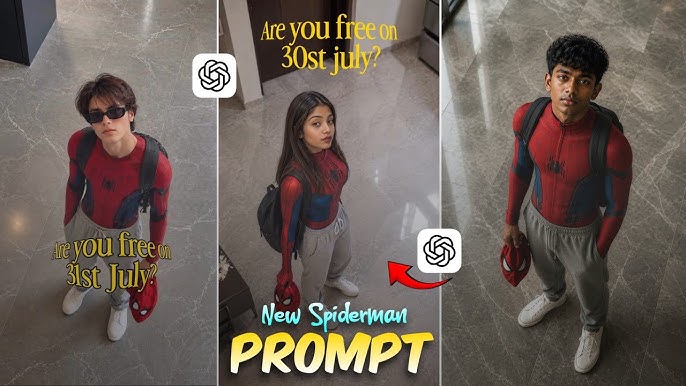
Prompt:
“A realistic high-angle full body shot of a young men with messy, textured black hair looking up at the camera.He is dressed in red and blue spider man bodysuit on his upper half, but wearing loose casual grey sweatpants on his lower half, white clean canvas shoes. He has black backpack on his shoulder and is holding red spider man mask in his left hand. he is standing indoors on a grey marbke tiled floor. The lighting is soft and natural. giving a casual ” Peter Parker after school” Vibe.”
Best Uses for AI Spider-Man Style Photos
You can use your creations for:
- Social media posts
- Wallpapers
- Digital art collections
- YouTube thumbnails
- Profile pictures
- Fan-inspired artwork
- Creative presentations
- Personal projects
Be mindful of intellectual property rules if you plan to use superhero-inspired images commercially. Creating original, spider-themed superhero designs rather than exact copyrighted character depictions is generally the safer approach.
Frequently Asked Questions
Can I make AI Spider-Man photos for free?
Yes. Many AI image generators offer free daily credits or limited free image generation.
Do I need Photoshop?
No.
Most AI tools create high-quality images without requiring professional editing software.
Which style looks the most realistic?
Photorealistic cinematic prompts with detailed lighting and textures generally produce the most lifelike results.
Can I use my own face?
Yes.
Many AI tools allow you to upload a selfie and transform it into a superhero-inspired portrait.
Why do my AI images look unrealistic?
Common reasons include:
- Weak prompts
- Low-quality source photos
- Missing lighting details
- Lack of descriptive keywords
Improving your prompt usually leads to much better results.
What image resolution should I use?
Higher resolutions such as 2048×2048 or 4K (when available) are better for wallpapers, printing, and high-quality social media posts.
Final Thoughts
Creating AI Spider-Man-inspired photos has never been easier. With today’s AI image generators, you can transform a simple idea—or even a selfie—into stunning superhero-style artwork in just a few minutes. The key to achieving impressive results is using detailed prompts, experimenting with different artistic styles, and refining your images through multiple generations.
Whether your goal is to create a dramatic profile picture, a cinematic poster, or eye-catching content for social media, AI provides countless creative possibilities. Focus on original, spider-themed concepts, pay attention to lighting, composition, and background details, and don’t hesitate to iterate until you achieve the look you want.
As AI technology continues to evolve, the quality and realism of generated images will only improve. Start experimenting today, save your favorite prompts, and keep exploring new techniques to create unique superhero-inspired artwork that stands out from the crowd.